Understanding advancement bonuses
Beyond per-match points, Footzil rewards you for correctly predicting which teams reach each phase of the tournament. These are your advancement bonuses — and you can see exactly how many you’ve earned, and from which teams, in both My Bracket and Results.
Where the points come from
Advancement bonuses come from your initial full-tournament prediction (the full_tournament round). For every team you predicted to reach a phase that actually gets there, you earn that phase’s bonus:
| Phase | Points per correct team |
|---|---|
| Reaches Round of 32 (R32) | 2 pts |
| Reaches Round of 16 (R16) | 1 pt |
| Reaches Quarterfinals (QF) | 1 pt |
| Reaches Semifinals (SF) | 1 pt |
| Reaches the Final | 5 pts |
| Reaches the 3rd-place match | 5 pts |
See Scoring for how per-match points work.
Your knockout pick colours
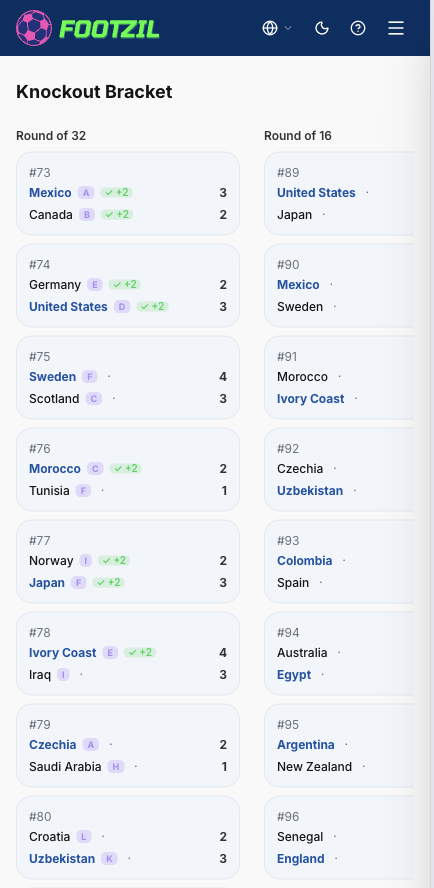
In the Results tab, each knockout match shows the real matchup (the teams that actually played) and, below it, your pick with the teams you predicted for that tie, in colour. This tells you at a glance why a match did or didn’t score:
- 🟢 Green — correct team. This is the team that actually played that tie. Only when both teams are green do you earn the scoreline points.
- 🟣 Purple — advanced (bonus only). The team did reach that phase, but elsewhere in the bracket: it earns you an advancement bonus (the ones on this page), but since it isn’t the real matchup the scoreline does not count.
- 🔴 Red — wrong team. The team didn’t reach that phase: no scoreline, no bonus.
This is why a knockout match can show 0 scoreline points even if you nailed the result: if you predicted different teams for that tie, the scoreline doesn’t apply — but the teams in purple still earned you an advancement bonus.
The color indicators
Wherever advancement is shown, each predicted team carries one of three indicators. They mean the same thing in My Bracket and in Results:
| Indicator | Color | What it means |
|---|---|---|
| ✓ +N | Green | The team you predicted reached this phase — you earned the bonus (+N points). |
| ✗ | Red | This phase is decided and your team did not reach it — no bonus. |
| · | Gray | This phase is still pending — not decided yet, so nothing is final. |
Decided vs. pending
A phase stays pending until its outcome is locked in:
- The Round of 32 stays pending until an admin confirms the official bracket after the group stage.
- Each later phase stays pending until the previous round finishes.
In Results
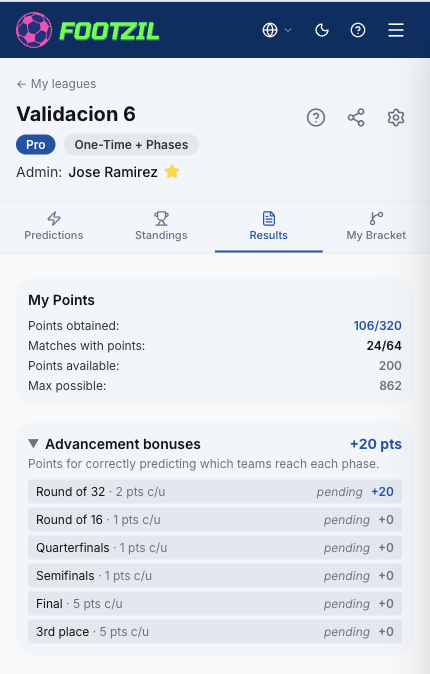
The Results tab has an Advancement bonuses panel. It’s collapsed by default — tap the header to open it.
- The header shows your total advancement points.
- Each phase row shows the points per team, how many of your predicted teams reached it (X/Y correct) or pending, and the points earned so far.
- Tap any phase row to expand it and see the exact teams, color-coded with the legend above.
In My Bracket
On My Bracket (the full-tournament view), each team in the knockout bracket carries the same ✓ / ✗ / · indicator next to its name, so you can see at a glance which of your picks earned a bonus.